
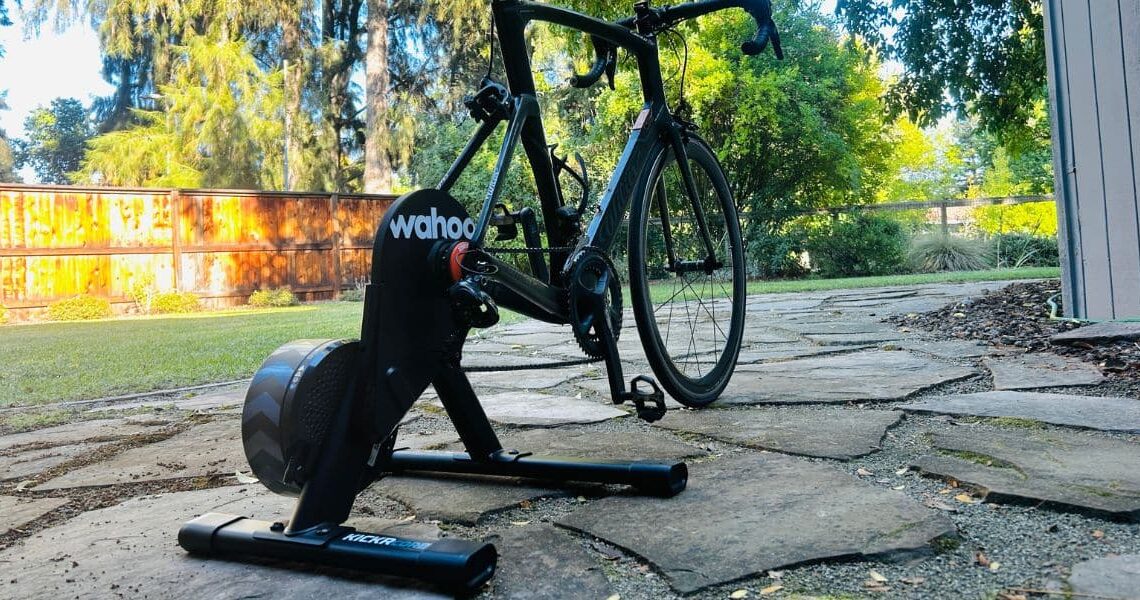

I figure I’m a typical fair weather virtual rider (or foul weather, really)… I ride the trainer when rain, snow or darkness — or smoke, here in Central Oregon — keeps me from heading outside. So when I do ride virtually, I’m looking for a turnkey, reliable experience. In the KICKR CORE 2 Zwift Cog version, I found just that — after the initial setup.

Background
The KICKR CORE 2 is the third smart trainer I’ve owned; the last one was the Zwift-branded version that was available for a couple of years, clearly the ancestor to the KICKR CORE 2. Since 2020, these trainers have gotten smaller, simpler to use, and quieter; with the advent of internal hubs like the one on the KICKR CORE 2 Zwift version, they’ve taken another step towards simplicity (except in the digital setup, which you’ll read about below).
If you ever ride indoors and don’t ride a smart trainer, I strongly suggest making the leap: The robust experience afforded by platforms like Zwift and Rouvy all but solve the boredom issue, and can enrich your training dramatically. Smart trainers remain more expensive than traditional, non-digital trainers, while less expensive yet fully functional models — like the KICKR CORE 2 — have narrowed the price gap.

Look closely and you’ll see that the KICKR CORE 2 wants you to get a solid workout.
Setting up the KICKR CORE 2
Even before unboxing the Zwift Cog version of the KICKR CORE 2, two things are clear:
- This product is all about Zwift compatibility.
- Wahoo wants to make certain that setup isn’t frustrating.
Orange Zwift elements are everywhere, as are QR codes that take you to setup videos. There’s a traditional, paper-based guide, but I felt steered towards the videos.


The KICKR CORE 2’s safe arrival seemed entirely safeguarded, thanks to the snuggest, die-cut packaging I’ve seen.

I’m not the handiest of users, but found physical setup to be simple and straightforward. I reviewed the guide and watched the videos, but really didn’t need to: attaching the legs and plugging in was entirely logical, but for one small point of confusion: I’d have expected the Wahoo labels on the legs to read in the same direction. But it didn’t take me long to figure out that they don’t.
Meanwhile, the KICKR CORE 2 came with all the tools you need to mount a quick release or through-axle bike. I did both, and found the process to be simple (and again, I’m no bike mechanic).

The trainer is not only ready for different wheel mounts, but also different axle size — with a handy-dandy sizing card provided for both QR and through-axle.

Dropping the bike onto the Zwift hub was also simple. I’ve only ever used traditional cassettes, so it felt strange not to have to find the right gear, but my chain slid on easily.
 This is the bike I use on a trainer, but my through axle bike was nearly as simple to mount.
Digital Setup
While the KICKR CORE 2 can be used with any virtual platform — or none at all, if you’re using a traditional cassette — the Zwift Cog and Click version that I rode is a Zwift-only product. This shouldn’t be a surprise, given the name. But this is where I ran into a bit of frustration.
Getting the KICKR CORE 2 ready to ride on Zwift (which is to say, getting it ready to ride at all) required me to use three different apps:
First I had to run a firmware update on the Wahoo app on my phone. (Note: this is not to be ignored! I initially tried to skip it but couldn’t proceed at all.)
Then I paired the trainer using the Zwift app on my laptop.
Then I paired the controllers — the buttons mounted on my handlebars — with the Zwift Companion app.
Finally I ran a spin-down calibration — back on the Wahoo app.
Phew!
None of this was terribly confusing, and of course pairing the controllers is necessary since that’s what you use to shift Cog and Click system — not the bike’s levers. But the process required a few more steps than I was expecting, and I was itching to get riding.
 The controllers as packaged…
 …and as I chose to mount them. Captain America stem cap not included.
The Riding Experience
Once I’d gone through this three-app, multi-layered process, I was ready to ride. And the riding experience was…pretty similar to the dozens of other Zwift rides I’ve taken on. I rode it with my power pedals and found that the watt readings were consistently very close, with no noticeable lag.
Also, while I haven’t had trouble with Zwift (or other platforms) dropping out while using other trainers, I noted that the KICKR CORE 2 has added a WiFi feature and “Race Mode,” together enhancing reliability and in-game responsiveness. The WiFi capability also allows for easier multiple pairings — a necessity if you’re using a heart rate monitor and other devices.

So: a similar experience, with some small improvements. That said, a few guiding takeaways:
- If you haven’t ridden with an internal hub — as I hadn’t — you might also miss the physical “click” of shifting gears. That said, the shifts are obvious — you feel them in your legs — and do seem very close to a typical one-gear graduation.
- I sure appreciated not having to mess with cable tension and even limit screws; both of my bikes fit right onto the Zwift hub. At first, the trainer wasn’t silent, giving off much more than the nice whir I was hoping for. After a bit of shifting I found a tolerable level of clicking; then with some barrel-adjuster twisting it was quieter still.
- Definitely try different positions for the control discs. As shown above, I placed the right one, the master, on the hood, and the left one on the top, but you might select something different. The classic rubber mounts make it easy to try different spots.
An important caveat: when I ride virtually, I’m primarily interested in the workout. I’ll ride free, or do a scripted workout, or race, but mostly I want to move my legs. I’m not a big gamification guy. I mention this because while I did test the steering capability, and found it pleasantly distracting, I don’t see using it after this test ride. Now that my KICKR CORE 2 with Zwift Cog and Click is set up, and now that I’ve gotten comfortable on it, I’ll use it to visit the pain cave, including all the fundamental elements that weren’t included: towels, fans, heavy metal, and a lot of water.


For demonstration purposes only…the KICKR CORE 2 does need to be plugged in!
The KICKR CORE 2, then, offers a similar experience to other late-model smart trainers that I’ve used — which is to say, largely a very positive experience. Plus it’s beautifully designed; I’ve left mine in our living room, and my wife hasn’t said a thing! (Good thing: this unit does not come with a built in carry-handle, though I didn’t find it difficult to move.)

But as to this Zwift-specific version: I’d suggest purchasing it if you’re a dedicated Zwiftie, confident you won’t want to try other platforms. If not, the KICKR CORE 2 non-Zwift version could be the relatively inexpensive, fully functional and rather elegant trainer for you.
The post REVIEW: Wahoo KICKR CORE 2 with Zwift Cog appeared first on PezCycling News.